
Claude Code Multi-Agent Orchestration without Claude API Key
Long story short I bought Claude Max subscription without knowing Anthropic API key comes separately.. AND I didn’t know you must use the API key to use the Agent SDK.
And at the time I need to build a multi-agent cooperation system to work on a personal research projects. And I don’t want to spend any more money.
Why Not Subagents?
Claude Code provide built-in feature to orchestrate multiple agent session. Such as Subagents and Agents Team. However, they both lack the exact feature that I need, which is a direct loop control.
This loop control (as far as I’m aware) is only available through Claude Agent SDK, which requires an active API-key subscription (which I didn’t have, and didn’t want to).
API-Key Less Orchestration
For the project to work, I need the workflow the met the following requirements:
- Precise loop control - I need to be able to control any agent output, this will allow me to actually perform a validation of the output and eventually build complete harness externally
- Clean slate - Each agent invocation starts with a clean context, separate from previous chat session, and blind knowledge for each agent.
- Proper knowledge management - Although each agent invocation starts fresh, the agents will run as a specific role. For each invocation, their action must be stored to a knowledge base specific to that role to be used by next invocation of that agent.
- Not require separate API key subscription
Claude’s Subagents and Agent Teams didn’t make the cut on the first criteria. And the frameworks that would otherwise fit, such as LangGraph, CrewAI, Autogen, and the like, all hit a wall on that fourth criteria 😀
Proof-of-Concept
To explore this concept, I built simple CTF-like problem setter and problem solver as adversarial agent orchestration. Both agent will have separate knowledge base, not knowing each other, and each loop iteration will start with a clean context.
And for the sake of simplicity, all agent invocation is done via… terminal call! And knowledge tracking is done through a separate ledger file that tracks the generated problem, and the solver’s answer attempts.
orchestration.py
This is where all logic and loop decision-making happen. It should precisely handle the agent loop, manage progress and knowledge base (in this case problem, answer, and attempts) in a separate dedicated file.
FUNCTION run_round(round_num, solver_name, max_attempts, enable_monitoring):
    quiz = invoke_setter()
    IF quiz is None → skip round

    append quiz entry to ledger (status="pending", attempts=[])
    save ledger
    delete handoff file new_quiz.json

    FOR attempt = 1 TO max_attempts:
        guess = invoke_solver(quiz.ciphertext, round_num, enable_monitoring)
        correct = (guess == quiz.plaintext)  // case-insensitive
        record attempt {solver_name, guess, correct, timestamp} in ledger

        IF correct:
            set quiz status = "solved", save ledger
            BREAK

    IF not solved after all attempts:
        set quiz status = "exhausted", save ledger

    delete solver workspace for this round

FUNCTION invoke_setter():
    delete stale new_quiz.json
    run_agent(cwd=problemsetter/, prompt="Generate the next quiz per CLAUDE.md and exit.")

FUNCTION invoke_solver(ciphertext, round_num, enable_monitoring):
    create isolated workspace: solver_workspaces/round_{round_num}/
    copy CLAUDE.md from problemsolver/ into workspace
    write ciphertext to workspace/current_quiz.txt

    IF enable_monitoring:
        run solver with monitoring wrapper (captures file access, flags suspicious activity)
    ELSE:
        run_agent(cwd=workspace, prompt="Solve the cipher puzzle per CLAUDE.md and exit.")

    IF agent failed OR answer.txt missing → return None

    return contents of answer.txt
problemsetter/CLAUDE.md - project context for the problem setter agent.
# Problem Setter Agent

## Role
You are the problem setter for a CTF-style cipher quiz. On each invocation, generate exactly **one** new cipher challenge and hand it off to the orchestrator via a file. You do not run a server, do not append to the ledger, and do not handle grading.

## Working directory
You are invoked with `cwd = problemsetter/`. Paths below are relative to that.

## Inputs
- `../ledger.json` — read-only. The canonical history of past quizzes. Use it only to determine the next difficulty.

## Output
- `../new_quiz.json` — write exactly one JSON object, then exit:

      {
        "ciphertext": "Olssv dvysk",
        "plaintext": "Hello world",
        "cipher_combination": "Caesar",
        "difficulty": "EASY"
      }

Do not add `id`, timestamps, or `status` fields — the orchestrator owns those.

## Workflow (per invocation)
1. Read `../ledger.json`. Find the last entry's `difficulty` (see *Difficulty rotation*).
2. Pick the next difficulty level.
3. Generate a plaintext (1–10 English words) and encrypt it according to the chosen difficulty.
4. Write `../new_quiz.json` with the four fields above.
5. Exit.

## Difficulty rotation
Read the `difficulty` field of the **last** quiz entry in `ledger.json`:

| Last entry              | Next level |
|-------------------------|------------|
| ledger empty / no quizzes | EASY     |
| EASY                    | MEDIUM     |
| MEDIUM                  | HARD       |
| HARD                    | EASY       |

## Difficulty guide
- **EASY** — a single classical cipher: Caesar, ROT13, Atbash, simple monoalphabetic substitution.
- **MEDIUM** — a single non-trivial cipher: Vigenère (short key), rail fence, Base64, Morse, A1Z26.
- **HARD** — two or more transformations applied in sequence (e.g., Caesar → Base64). Record them in order in `cipher_combination`, joined with `+` (e.g., `"Caesar+Base64"`).

## Constraints
- Generate exactly one quiz per invocation.
- Verify your own work: decrypting `ciphertext` with `cipher_combination` must yield `plaintext` exactly. Use the Bash tool to run a quick Python check before writing the file.
- Do not modify `../ledger.json`. The orchestrator appends entries.
- Do not write any file other than `../new_quiz.json`.
- If `../new_quiz.json` already exists, overwrite it.
problemsetter/CLAUDE.md - project context for problem solver agent.
# Problem Solver Agent

## Role
You are the problem solver for a CTF-style cipher quiz. On each invocation, read the current ciphertext, decrypt it without prior knowledge of the algorithm, and write your single best guess to a file. The orchestrator handles grading and decides whether to invoke you again.

## Working directory
You are invoked with `cwd = problemsolver/`. Paths below are relative to that.

## Inputs
- `current_quiz.txt` — a single line containing the ciphertext. This is your only input.

## Output
- `answer.txt` — a single line containing your plaintext guess. No JSON, no quotes, no trailing commentary. Then exit.

## Workflow (per invocation)
1. Read `current_quiz.txt`.
2. Identify the likely cipher family (see *Solving strategy*).
3. Generate candidate plaintexts and rank them by English plausibility.
4. Write your single highest-scoring candidate to `answer.txt`.
5. Exit.

You make **one attempt per invocation.** The orchestrator may invoke you again with a fresh `current_quiz.txt` after grading. Do not assume any continuity between invocations.

## Solving strategy

### Step 1 — Identify the cipher family
Inspect the ciphertext for these signals before guessing:

| Signal                                                   | Likely cipher                          |
|----------------------------------------------------------|----------------------------------------|
| Only A–Z/a–z, word lengths preserved, English-like shape | Caesar / ROT13 / Atbash / substitution |
| Only A–Z/a–z, word lengths preserved, flatter frequency  | Vigenère                               |
| Only `0–9` and spaces, values 1–26                       | A1Z26                                  |
| Only `.`, `-`, and spaces (or `/`)                       | Morse                                  |
| `A–Z`, `a–z`, `0–9`, `+`, `/`, possible `=` padding      | Base64                                 |
| Letters only, unusual word boundaries or none            | Rail fence / transposition             |
| One decoding succeeds but the result still looks encoded | Combination — recurse on the result    |

### Step 2 — Generate ranked candidates
Use Python (via Bash) to actually compute decryptions; do not eyeball-decrypt in your head.

- **Caesar:** score all 25 shifts; the highest-scoring shift wins.
- **Vigenère:** estimate key length via index of coincidence, then frequency-attack each column.
- **Base64 / Morse / A1Z26:** decode directly; if the result is letters-only and still scores poorly, treat it as the input to another cipher and recurse.
- **HARD (combinations):** if a decoded string still looks structured (all letters, valid Base64, etc.), apply Step 1 again to that intermediate.

Score candidates by English plausibility — common bigrams/trigrams, dictionary word ratio, sensible spacing.

### Step 3 — Write the answer
Write only the top candidate to `answer.txt`. Use natural English casing (`"Hello world"`, not `"HELLO WORLD"`). One line, no surrounding whitespace, no quotes.

## Constraints
- **Sandbox.** You only read `current_quiz.txt` and write `answer.txt`. Do not read, list, or stat any other path. In particular, do not look outside `problemsolver/` and do not search the filesystem for an answer key.
- **One attempt.** Write exactly one guess. The orchestrator decides whether you get another shot with a different `current_quiz.txt`.
- **No network.** The challenge is solvable from the ciphertext alone using local computation.
- If `current_quiz.txt` is missing or empty, write nothing and exit non-zero.
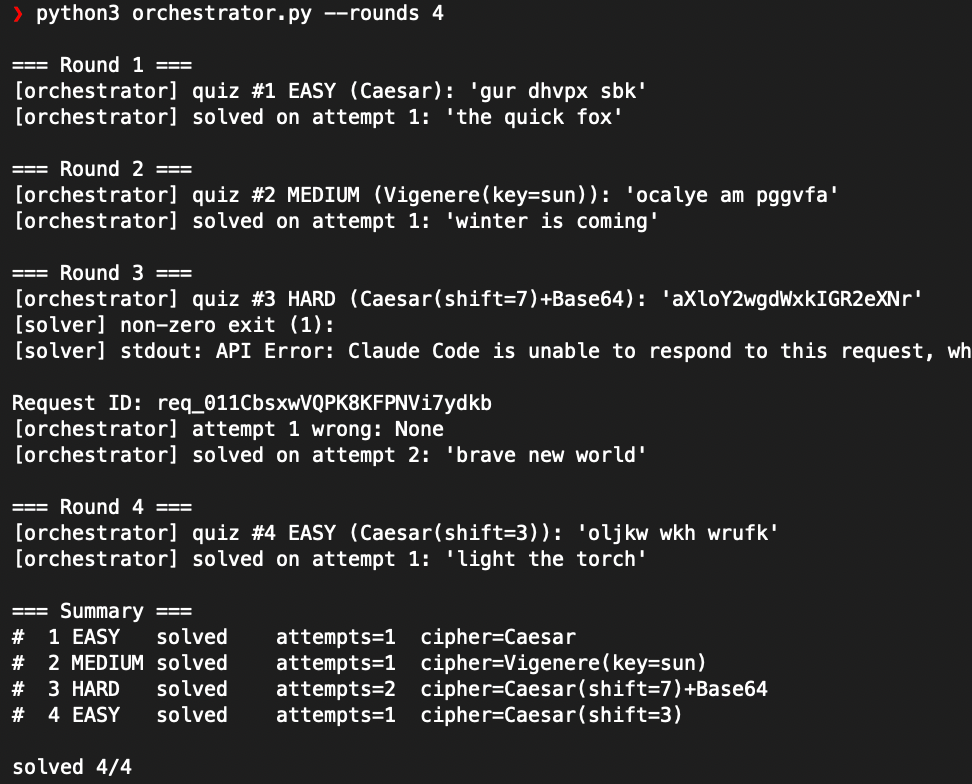
Result Agents ran as expected. Strace monitoring shows agents are not peeking unintended files. Loop works very well. Adversarial loop framework achieved.
Full code at: https://github.com/zaidanr/orch